

How to Run a Rental Walkthrough That Holds Up in Court
Your move-out photos won't save you in a Florida deposit dispute — but a walkthrough built like courtroom evidence will. Here's how to document a rental so it holds up.
Your walkthrough is the exhibit you hand a judge
Here's a scene that plays out in Orange and Hillsborough county courts every month. A landlord stands up, holds out a phone full of move-out photos, and explains the carpet was ruined. The tenant says it looked like that the day they moved in. The judge asks the landlord one question: show me what it looked like at move-in. And the landlord has nothing.
That landlord loses. Not because the tenant was right — because the documentation couldn't prove otherwise.
Quick answer: Rental walkthrough inspection documentation holds up in Florida when it's built like evidence, not paperwork. You need a move-in baseline, time-stamped photos kept as original files, and a condition form the tenant signs room by room. The walkthrough isn't a formality. It's the exhibit you'll hand a county judge if the deposit gets contested.
Most landlords treat the walkthrough as a chore. Snap some photos, file the form, move on. Then a deposit dispute lands eight months later, and the file they built falls apart under the one test that matters. We call it "The Exhibit Test": before move-in day, look at every photo and every form and ask one question — would this survive being handed to a judge? If it wouldn't, it isn't done.
This is a Florida-specific problem with a Florida-specific fix. Let's build a walkthrough that wins.
Why do most landlords' walkthrough photos get thrown out?
Quick answer: Most walkthrough photos fail in a Florida deposit dispute for three reasons: there's no move-in baseline to compare against, the photos carry no reliable timestamp, and the tenant never acknowledged the condition in writing. Each gap hands the tenant the same defense — it was already like that.
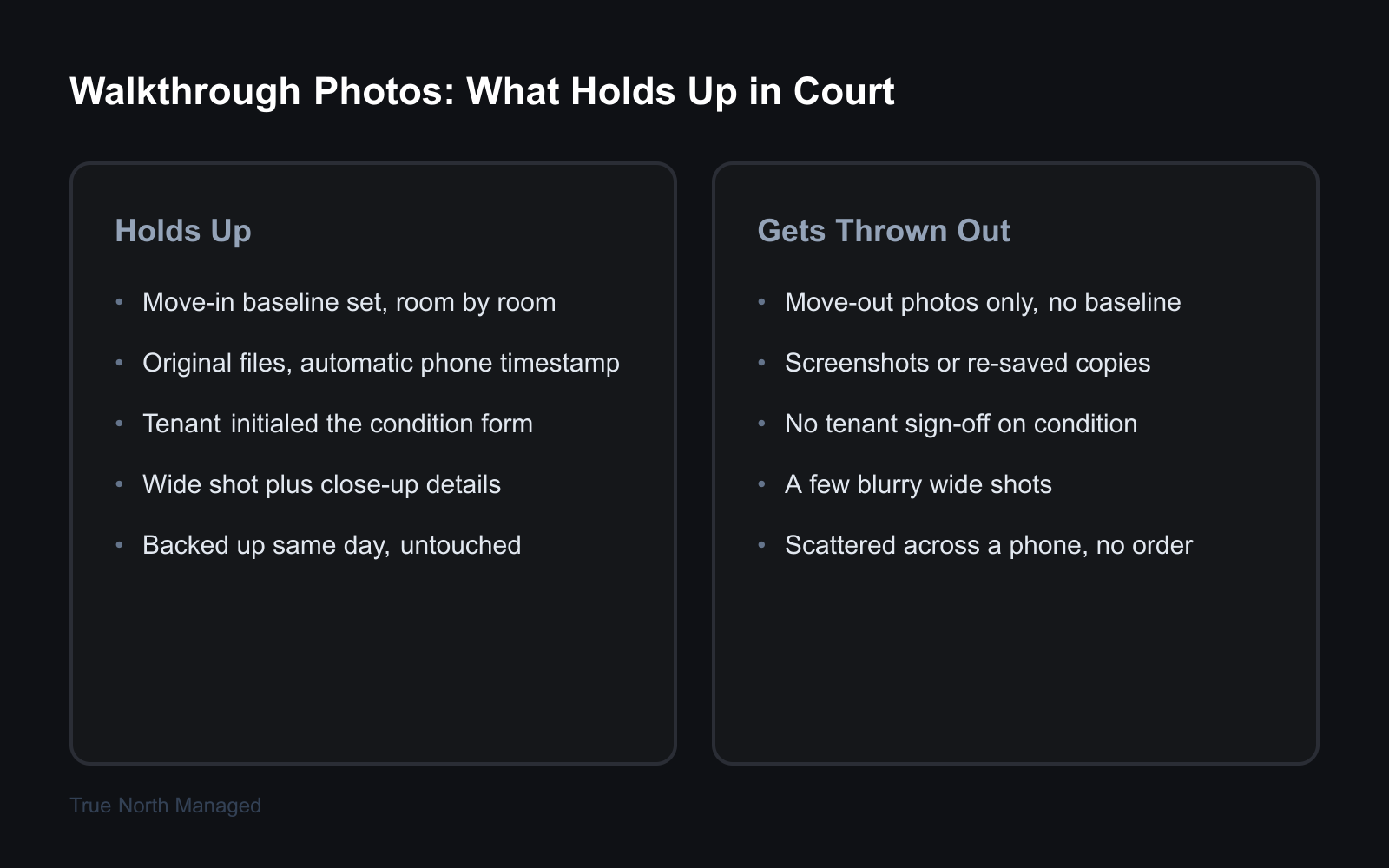
Think about what a phone full of move-out photos actually proves. It proves the property looked a certain way on the day the tenant left. That's it. It says nothing about move-in day, and a deposit dispute is entirely a question of the difference between those two days.
Three failure points sink most documentation:
- No move-in baseline. A move-in inspection isn't legally required in Florida — which is exactly why so few landlords do one. Without a baseline, there's no before-and-after, just an after.
- No reliable timestamp. Printed photos, screenshots, images texted to yourself and re-saved — all of it strips or scrambles the capture data. A photo with no provable date is a photo of an unknown day.
- No tenant acknowledgment. If the tenant never signed off on the condition at move-in, they're free to claim every scuff and stain was there before they unpacked a box.
A pile of photos isn't documentation. It's a pile of photos. The difference is whether it can answer a judge's questions in order — and most can't.
What makes walkthrough documentation hold up in a Florida deposit dispute?
Quick answer: Documentation holds up when it satisfies three things at once: a dated move-in baseline, photos authenticated by reliable metadata, and a tenant-signed condition form. Together they let you prove the property's condition changed during the tenancy.
Three pillars hold it up.
A move-in baseline. This is the single most valuable piece of evidence you'll ever collect, and it costs you one afternoon. Photograph every room before the tenant moves a single item in. Empty walls, empty floors, every appliance, inside every cabinet. That set of images is your "day zero." Without it, you have no case — only an opinion.
Authenticated, time-stamped photos. Photos taken on a phone carry EXIF metadata — the embedded capture date, time, and sometimes GPS location. That metadata is what links a photo to a real moment instead of a claimed one. It's powerful, but be honest with yourself about its limits: EXIF date and time can be altered if someone changes a device clock or edits the file. So metadata isn't bulletproof on its own — it's corroborating evidence. It's strongest when you pair it with original files you never re-saved and a tenant signature from the same day.
A tenant-signed condition form. A document the tenant signed acknowledging the property's condition closes the "it was already like that" defense. The form turns your version of move-in day into a shared, agreed version. We'll cover how to get that signature in a minute.
Miss any one pillar and the other two get weaker. All three together is a file a judge can actually rule on.
How should you photograph a rental so the images survive court?
Quick answer: Photograph a Florida rental so it survives court by checking your phone's clock is set to automatic date and time, shooting room by room in a fixed order, taking both wide and close-up shots, and saving the originals untouched. Never use screenshots or re-saved copies — re-encoding an image can strip or change the metadata that proves when you took it.

Here's the photo system, and it's the same whether you own one duplex or twelve.
What you must do — the move-in photo protocol:
- Set the phone to automatic date and time. Go to your phone's settings and confirm the clock pulls from the network. A phone left on automatic produces a timestamp you didn't touch — which is worth far more than one you set by hand.
- Shoot a fixed room-by-room sequence. Same order every time, every property. Front door, then clockwise through each room, then exterior. A consistent sequence is what lets you hand a judge a story instead of a shuffle.
- Take a wide shot, then the details. One wide frame to establish the room, then close-ups of anything that matters — corners, baseboards, appliance interiors, the inside of the dishwasher, under the sinks. Three blurry wide shots of a living room prove nothing about a specific wall.
- Capture the condition that's already there. Pre-existing scuffs, the worn patch on the carpet, the chip in the counter. Photographing damage that exists before the tenant arrives is what stops you from being blamed for it later.
- Keep the originals and back them up the same day. Don't text them to yourself. Don't screenshot them. Move the original files straight to a cloud folder labeled with the property and the date. That folder is your chain — camera roll to backup, untouched.
A solid move-in set runs 40 to 80 photos for a typical single-family home. That sounds like a lot until you're standing in court wishing you had one more.
For the room-by-room list of what to capture in each space, our Florida move-in inspection checklist walks the whole property so nothing gets missed.
How do you get the tenant to sign off on the property's condition?
Quick answer: Get the tenant's sign-off by walking the property with them on move-in day and having them initial a written condition form room by room. Hand them the form alongside the lease, give them a copy of the photos, and set a short written deadline to flag anything they disagree with. Their initials turn your record into a shared one.
A photo set proves your view of move-in day. A signed condition form proves the tenant agreed with it. That's a different, much stronger thing — and it's the piece most landlords skip.
Do a joint walkthrough. Schedule it for the day the tenant takes possession, before the moving truck shows up, and walk every room together. Bring a condition form with a line for each room and a column for the tenant's initials. As you walk, they initial each room — acknowledging they saw it and agree with how the form describes it. Initials per room beat one signature at the bottom, because a single signature is easy to wave off as "I didn't really look." Twelve sets of initials are not.
Give the tenant a copy of the form and a copy of the move-in photos the same day. Then put a short window in writing — say, five days — for them to report anything they think the form got wrong. A tenant who received the documentation and didn't object has a much harder time disputing it later.
What if the tenant won't show up for the walkthrough? Do it anyway, solo, and document it fully. Then email them the completed form and the full photo set with a dated message asking them to review and respond. Their non-response, on a timestamped email, becomes part of the file. The deposit itself is governed by Florida's security deposit law — and that law assumes you can prove condition. The signed form is how you do it.
What is the deposit-claim clock under Florida law?
Quick answer: Florida Statute 83.49 sets two hard deadlines after a tenancy ends. If you're not claiming anything, you must return the full deposit within 15 days. If you are imposing a claim, you must send the tenant written notice within 30 days. Miss the 30-day window and you forfeit the right to impose a claim on the deposit — no matter how good your evidence is — though the statute still lets you "file an action for damages after returning the security deposit to the tenant."
Your walkthrough file can be airtight and still lose you money if you blow the clock. So know it cold.
- 15 days — no claim. If you don't intend to keep any of the deposit, return all of it within 15 days of the tenancy ending.
- 30 days — claim notice. If you do intend to keep part or all of it, you must send written notice within 30 days "after the termination of the rental agreement", "by certified mail to the tenant's last known mailing address or by e-mail in accordance with s. 83.505".
- 15 days — tenant's objection window. Once the tenant receives your notice, they have 15 days to object in writing. If they don't object, you may deduct your claimed amount.
Here's the part that stings. Florida Statute 83.49(3)(a) is explicit: "If the landlord fails to give the required written notice within the 30-day period, he or she forfeits the right to impose a claim upon the security deposit and may not seek a setoff against the deposit but may file an action for damages after returning the security deposit to the tenant." The best move-in baseline in Orlando won't save the deduction if the notice goes out on day 31 — it only supports a separate damages suit, filed after the deposit goes back.
And there's real money on the line beyond the deposit. If either side takes the dispute to court, the statute awards the prevailing party court costs plus a reasonable attorney's fee. Deposit disputes are filed in Florida county court, small claims division, where simplified small-claims procedural rules apply to disputes up to $8,000. Lose a contested claim and you could be paying the tenant's lawyer on top of returning the deposit. Win it with solid documentation, and the tenant may be covering yours. That's how much the walkthrough is worth.
Common mistakes that sink a deposit claim
Quick answer: The deposit claims that fail in Florida court usually fail for avoidable reasons: relying on move-out photos with no move-in baseline, writing a vague claim notice, missing the 30-day deadline, or charging the tenant for normal wear and tear that Florida law doesn't allow you to deduct.
Three mistakes show up over and over.
Move-out photos with no baseline. We keep coming back to this because it's the one that sinks the most claims. Move-out photos alone prove nothing a judge can use. Always pair them with the move-in set — and our Florida move-out inspection checklist shows how to mirror the move-in walkthrough so the two sets line up cleanly.
A vague claim notice. "Damages — $600" tells the tenant nothing and tells a judge less. Itemize it: the room, the specific damage, the repair, the cost. A precise notice is harder to fight.
Charging for normal wear. Florida law lets you deduct for damage beyond normal wear and tear — not for the wear itself. Faded paint, small nail holes, lightly worn carpet in the walkways: that's the cost of renting a property, and you can't bill it. Holes in the wall, burned or torn carpet, broken fixtures — that's damage. When the line gets blurry and the damage is severe, our guide on what to do when a tenant damages your property breaks down where it falls.
A walkthrough done right makes every one of these mistakes hard to commit. The baseline forces the comparison. The itemized form forces the precise notice. The condition record forces the honest wear-versus-damage call.
Build the file before you need it
The landlords who win deposit disputes in Florida aren't lucky and they aren't ruthless. They just did the work on move-in day — the baseline photos, the metadata, the signed form — and built a file that answers a judge's questions before the judge asks them.
That's the whole job. Treat every walkthrough like the exhibit it might become, and the dispute that scares most landlords turns into a non-event.
If you'd rather not run that process on every turnover yourself — especially if you're managing from out of state and can't be there on move-in day — that's where a property manager earns the fee. We document every Florida rental we manage to the standard a county court expects. Request a free rental analysis and we'll show you what airtight documentation looks like for your property. For the full operations playbook, the Florida Owner's Guide covers the rest of the rental lifecycle.